Billing, Credits & API Keys
1 credit = $1 USD. Usage is metered on AI-voice time — the seconds a voice model is actually connected to your call, prorated without rounding up minutes. The platform fee is currently $0, waived from the standard $0.10/minute. A platform fee may apply in future; the current fee stays visible in Billing.
A call on Parrot's shared AI key has a separate AI fee: connection minutes × that key's configured USD/minute cost × 2. The key's current customer rate appears on its AI provider page. A call on your own provider key has no AI fee from Parrot — your provider bills that usage directly. Each connection keeps its price. Switching keys during a call prices each key's connected time separately; reconnecting the same key retains its current price. This page covers the Billing page (balance, ledger, usage), the Account page (your limits), and API keys.
The Billing page
Open Billing in the console. The credits pill in the top bar opens Account, where you can invite friends for free credits or top up.
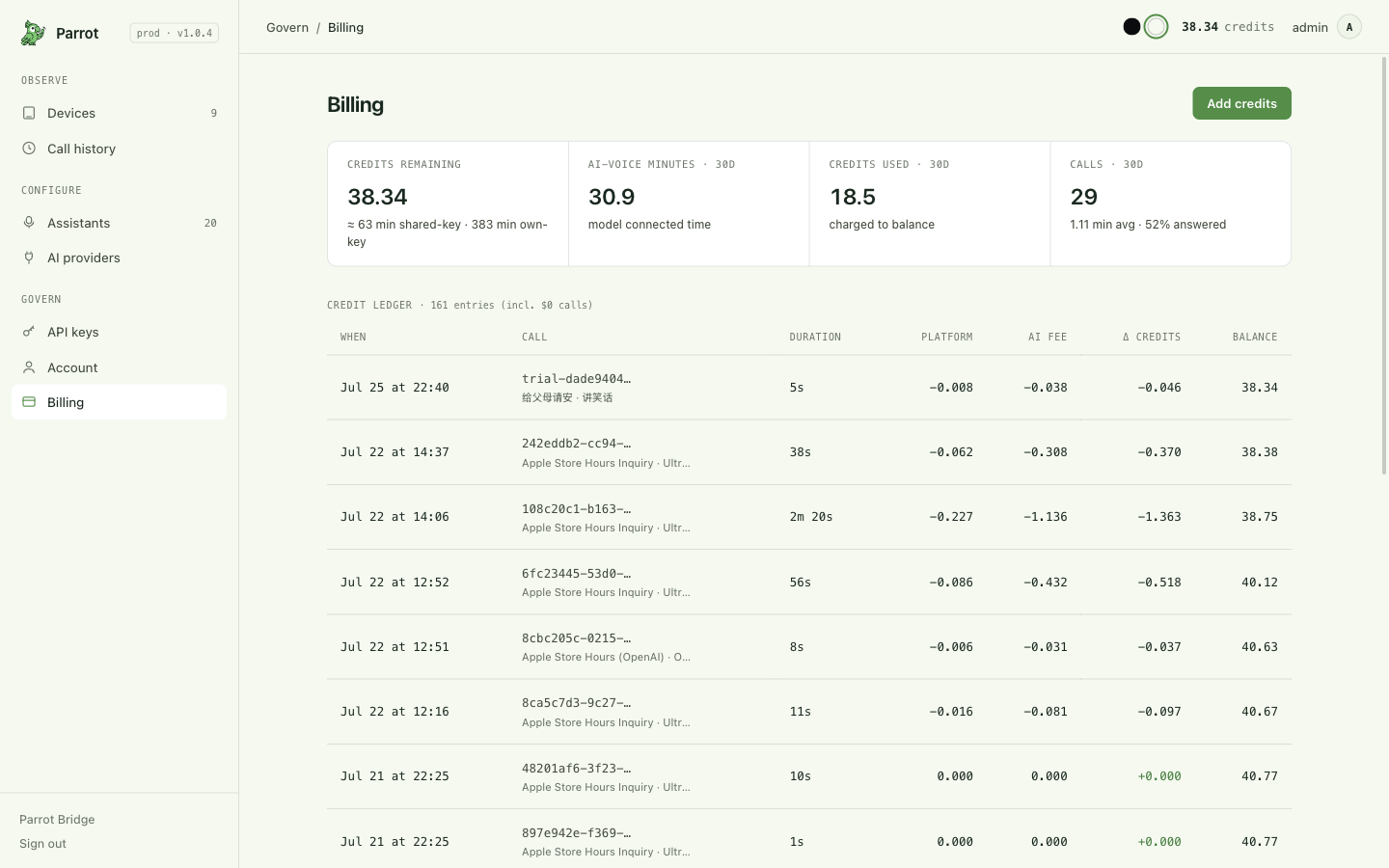
Up top, four numbers:
- Credits remaining — your balance in USD credits. Turns red at zero.
- AI-voice minutes (30d) — how much model-connected time you've used.
- Credits used (30d) — what that time cost.
- Calls (30d) — how many, their average length, and how many were answered.
The top-up on Account offers one package: 10 credits for $10 USD, paid once through Stripe Checkout. There is no subscription or adjustable purchase amount. Credits arrive only after payment is confirmed. Cancelling adds no credits. If confirmation is delayed, use Check payment status on your return page; checking again cannot credit the same purchase twice.
If payments have not been enabled, the page says so. Invitations remain available. When a payment is refunded, the corresponding credits are deducted and shown as a separate Payment refund movement.
The ledger
Every movement is its own row. Platform fee and AI fee are two separate ledger entries linked to the same call. The waived platform fee remains visible as a $0 entry; an own-key call has no AI-fee entry. Long calls can have several entries as usage is recorded during the call. Purchases, grants and refunds each have their own entries too.
The Balance column is the actual stored balance after that movement. The page shows the 200 most recent movements, with ten rows per page.
Usage breakdowns
Below the ledger, your last 30 days sliced up: calls per day, by provider, by client (API key) — that one tells you which connected agent is spending what (calls placed by hand in the console show as "Manual / dashboard") — by assistant, and an outcomes row (how many answered / no answer / failed).
Limits that protect you
The guardrails all refuse a call before dialing rather than surprising you afterward:
- Out of credit — at zero balance, the next chargeable AI session is refused. A zero-cost session, such as your own key while the platform fee is waived, can still start. A call already in progress is never cut off for credits (the balance can dip slightly negative instead; the refusal hits the next call).
- Per-call duration cap — every call carries a maximum duration; ask for more than your account's ceiling and it's quietly lowered, never errored. When time runs out, the call is ended cleanly. Your ceiling is shown on the Account page; console-placed calls use a 5-minute cap on top of it.
- Daily call limit — a per-account cap on dials per day. Only calls that actually connect count against it.
An agent connected over MCP hits exactly the same guardrails — a key can never spend past the account's limits.
The Account page
Account (separate from Billing in the sidebar) is your profile plus the account's standing limits: how many devices you can register, and the maximum call duration that clamps every dial — the number to check if calls seem to end early. Sign-out lives here too.
Invite friends
The Invite your friends section in Account brings together your personal invite link,
provider usage rates and a Stripe top-up: 10 credits for $10 USD. Our current focus is helping
more people try Parrot, and inviting friends earns free credits. Your invite link is
(https://parrotvoice.app/r/…). Anyone who signs up through it starts with
15 extra credits, and you get 30. The connection time these buy depends
on the key's rate.
- The credits arrive the moment they sign in for the first time. There is no waiting period and nothing to claim: both balances move at signup, and each reward is an ordinary row in your ledger ("Referral bonus"), with the running balance to prove it.
- There is no limit on how many friends you can invite, and no limit on what you can earn. The Account page keeps two numbers — how many friends joined, and the credits they have earned you.
- Only the person you invite counts. If they go on to invite someone else, that reward is theirs; invitations don't pay upward through a chain.
- We never show you who joined. Parrot tells you the count, not the people. The other direction is not private, though: whoever opens your link sees your username on the sign-in page ("Referred by you@example.com"), so they know who vouched for it — worth remembering before posting the link somewhere public.
Sending your own link back to yourself doesn't pay — an invite has to bring somebody new.
API keys
Open API keys in the console. A key is how anything outside the console — an MCP agent — uses your account, and the model is deliberately narrow: each key is bound to exactly one device (one phone line), and whoever holds it can use only that line.
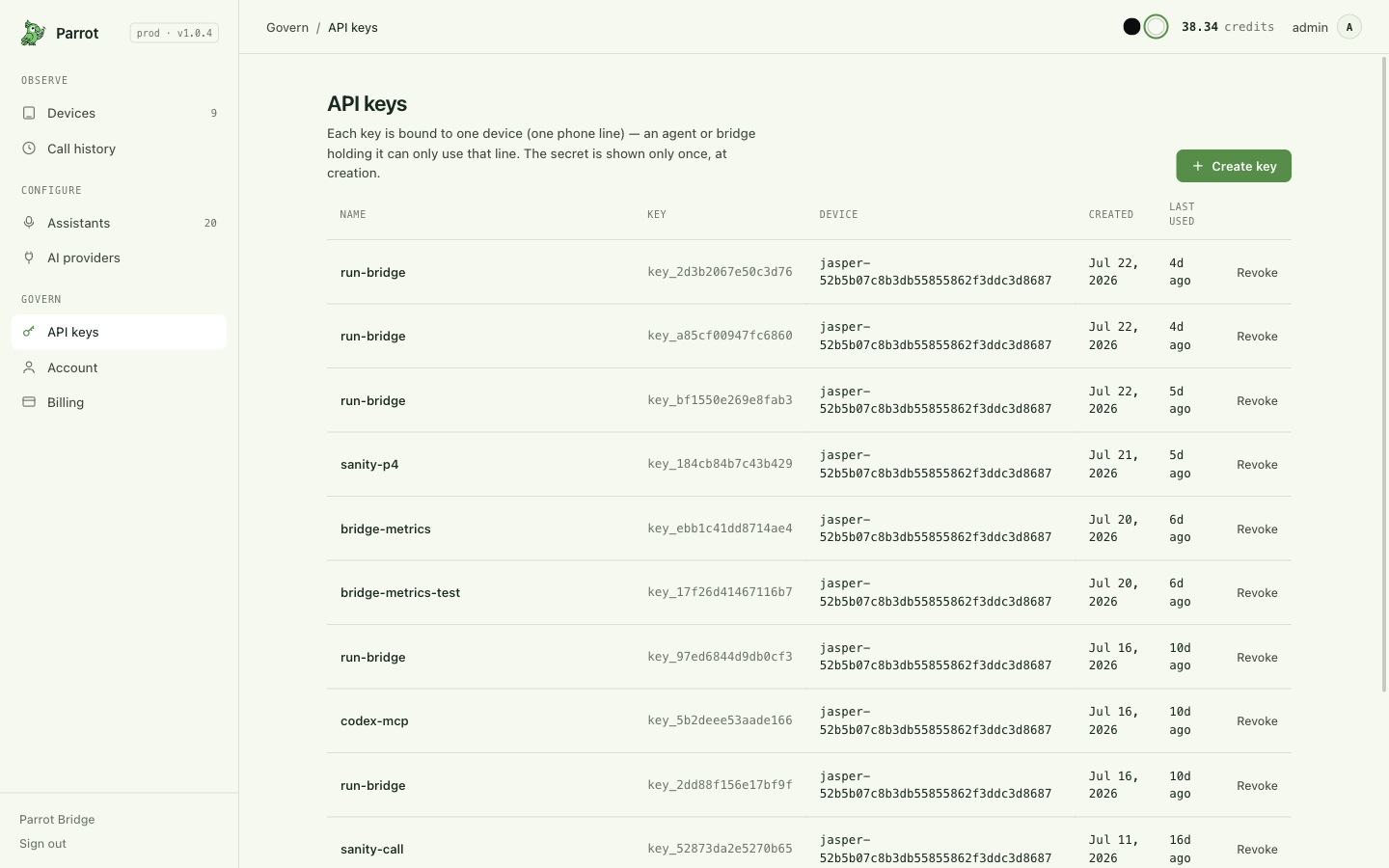
- Create — name the key and pick which device it's for. The secret is shown once, at creation — copy it then; it can't be redisplayed.
- Revoke — delete a key and whatever held it loses access immediately. (The wider trust model — board identity, ownership, what a key can't do — is on Security & trust.) Rotating = create a new key, update your agent's config, delete the old.
- The list shows each key's device, creation date, and when it was last used — a key that's never used is a key you can safely revoke.
- The fastest path for agent setup isn't even this page — each device's MCP page mints a key and drops it straight into a ready-to-paste client config (Connect your AI agent).
Since the billing page breaks usage down by key, giving each agent its own named key (rather than sharing one) keeps spend attribution clean.
Where this fits
Credits meter the calls; everything that makes the calls worth paying for is in the rest of the docs — start at Making & receiving calls if you're new, or its troubleshooting if a dial got refused and you're here to find out why.