The Bridge

This chapter covers the highlighted hop: the Parrot bridge.
The bridge is the middle of the path: the program that connects your board to Parrot Cloud. It runs in your browser tab — the same Parrot Bridge page that flashed the board keeps hosting its connection afterwards. The bridge program is compiled to WebAssembly and executes right in the page: it talks to the board over Web Serial, to Parrot over a WebSocket, and shuttles call audio between the two. That's why there's nothing to install — and why the tab matters.
Open the Parrot Bridge — Google Chrome on a desktop. The Console itself works in any modern browser; only this hardware Bridge page requires Chrome.
The live view
While the bridge runs, the page shows:
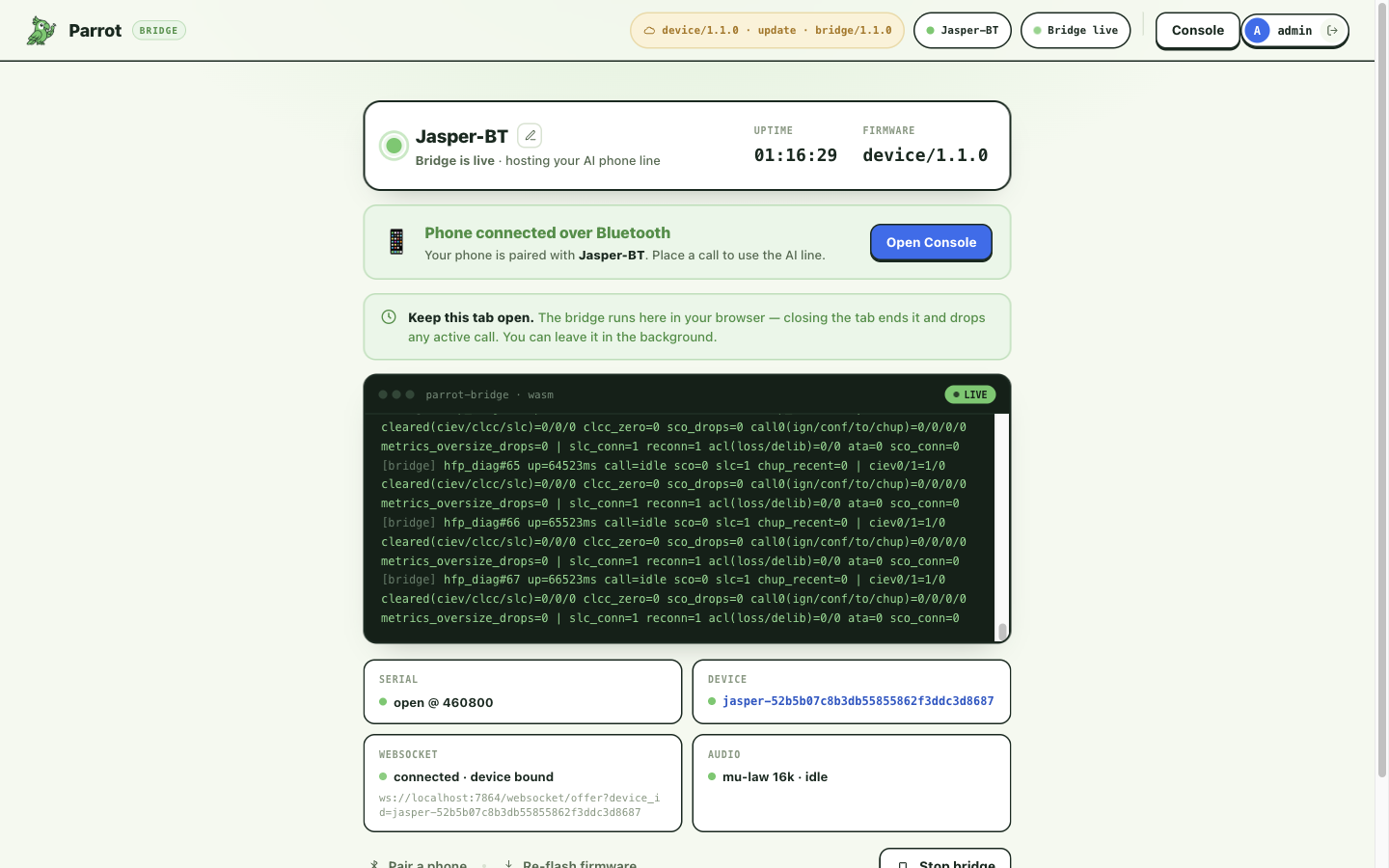
- A Bluetooth banner walking you through the current state — "Ready to pair", "Phone connected over Bluetooth", "On a call", or what's wrong and how to fix it. Once the bridge has reached Parrot it also carries the Open this device in the console button, which lands on this board's own console page (the header's Console button goes there too).
- Four status tiles — Serial (the USB wire to the board), Device (the board's identity), Server link (the link to Parrot Cloud), Audio (the call audio stream) — so when something's unhappy you can see which link it is.
- The bridge's own console log — the same stream a developer would read; useful verbatim in a support conversation.
- Pair a phone / Re-flash firmware / Stop bridge actions.
The tab is the line
Keep the tab open
The connection literally runs inside the tab:
- Closing the tab takes the line offline and drops any active call. Leaving it in the background is fine.
- The computer must stay awake with the board plugged into it — a laptop going to sleep takes the line down too.
- One tab per board. Each board needs its own Bridge tab hosting it.
Do I have to keep my computer on?
Today, yes — the board connects through the Bridge tab in your browser, so the line is up while that tab is open and the computer is awake.
Starting, stopping, reconnecting
- Start: the Quickstart's flow ends with Run the bridge — that's all a start is.
- Auto-start the bridge (the setup screen's tab-level toggle, on by default) starts the bridge whenever the page opens — or the board plugs back in — while you're signed in and the port is already authorized: no extra click, no re-flashing. Pressing Stop always wins: after a deliberate stop the bridge stays down until you start it yourself.
- Stop bridge ends the bridge deliberately (with a confirm) — the firmware stays flashed; the board just loses its path to Parrot and hides its Bluetooth after the usual grace.
- Unplugging the board stops the bridge and returns the page to Connect.
Updating the bridge
The bridge's version shows in the page header (… · bridge/…), next to the
firmware's. The bridge is part of the web page, so a reload picks up the
newest build — no action beyond refreshing the tab. (Firmware is
different — it updates by re-flashing; see
Firmware versions & updates.)
When the server refuses the connection
The server can turn a bridge connection away, and the live view tells you why on the Server link tile — the bridge stops retrying and offers the fix in a dialog:
- Version rejections — the server can require minimum versions. Bridge too old → Reload now (a page reload updates it). Firmware too old → Update firmware (a re-flash; Firmware versions & updates).
- Account rejections look similar but re-flashing won't fix them: "Sign in required" (session expired — sign in again), "Device not linked to your account" / "Signed in to the wrong account" (the board belongs to a different account — flash it from yours to claim it, or sign in as its owner).
When something goes wrong
Parrot Bridge shows a short code like PB-2001, one sentence on why it
happened, and one thing to do about it. Find your code in the
reference below for the full explanation and steps.
Bridge error codes
The number tells you whose problem it is. 1xxx your browser or computer ·
2xxx the cable and the port · 3xxx the board itself · 4xxx your account ·
5xxx Parrot's service — the last group is on us, not on you.
Reporting a problem
Expand Details under any error and click Copy diagnostics. That copies the code, what we detected, and the log — everything we need in one paste.
If the error showed a known: tag
That means we already know about this particular situation, so you don't need to report it. The details are in that code's section below. Not every known situation is a bug in Parrot — some are just facts about a driver or an operating system that are useful to know about.
1xxx · Your browser or computer
PB-1001
This browser cannot connect to your board through USB.
What to do
- Open Chrome, Dia, or Edge with Web Serial on a desktop or laptop computer.
- Go to the same page address you are on now.
- Sign in and connect your board there.
What this code does not mean. This is not a problem with your board, your cable, or your account.
PB-1010
Chrome asks your permission before a page may use a device. That permission was declined, or has been cleared.
What to do
- Click Try again. Chrome shows a short list of devices.
- Choose your board and click Connect.
- If no list appears, click the icon at the left of the address bar, then allow this site to use serial ports.
What this code does not mean. Chrome remembers this choice per site, so you normally only do it once.
PB-1020
This board's USB chip needs a driver from its maker before your computer can talk to it.
What to do
- Download the driver for your chip from its maker (the button on the error links to it).
- Install it and restart the computer — the driver only loads at boot.
- Plug the board back in and try again.
Still stuck? (technical)
CH340/CH341 and older CH9102 need the WCH driver on Windows and macOS. CP210x and FTDI are driverless on both.
What this code does not mean. If your board's USB chip is a CP2102 or FTDI, you do NOT need a driver — this code will not appear for those.
2xxx · The cable and the port
PB-2001
A board can only talk to one program at a time, and something else on this computer got there first.
What to do
- Close any other Parrot tab or window. That is the usual cause.
- Unplug the board, count to three, and plug it back in.
- Click Try again and pick your board from the list Chrome shows.
Still stuck? (technical)
If you have run other board software on this computer, close it too — the Arduino or PlatformIO serial monitor, PuTTY, idf.py monitor, screen or minicom.
What this code does not mean. This is not a driver problem and not a broken board. The port is simply taken.
PB-2010
Your computer could see the board a moment ago and now it can't.
What to do
- Push the cable firmly in at both ends.
- Use a cable that carries data. Many USB cables only carry power, and a board is invisible through one.
- Plug straight into the computer rather than through a hub, dock or monitor.
- If the bridge was running, it restarts on its own once the board is back.
What this code does not mean. This is not a problem with the firmware on the board.
PB-2020
No board has been granted to this page yet, or more than one has.
What to do
- Click Connect a board.
- Pick the board you want to use from Chrome's list.
- If several boards are plugged in, unplug the ones you are not using.
Still stuck? (technical)
Parrot refuses to guess between two granted ports rather than pick the wrong board.
What this code does not mean. This does not mean a board is broken — it means Parrot does not know which one you mean.
PB-2030
The board is plugged in but not running, so Bluetooth is off and your phone can't see it.
What to do
- Tap the RST button on the board.
- If nothing happens, unplug the board and plug it back in.
- Wait a few seconds — Bluetooth comes up on its own once the board is running.
Still stuck? (technical)
The bridge stays connected through this and resyncs when heartbeats resume; there is no need to reconnect.
What this code does not mean. Your phone line is not lost. Parrot keeps the session and picks the board back up by itself.
3xxx · The board itself
PB-3010
Some boards can't be switched into setup mode by software — the buttons on the board do it.
What to do
- Find the two small buttons on the board. One is marked BOOT, the other RST (sometimes EN).
- Press and hold BOOT. Keep holding it for the next two steps.
- Tap RST once and let go of RST — keep holding BOOT.
- Click Try again, then let go of BOOT once the log starts moving.
Still stuck? (technical)
Classic ESP32 has no software path into the ROM download loader — only GPIO0-low-at-reset reaches it, so an unreliable auto-reset circuit leaves the button sequence as the only route.
What this code does not mean. Nothing is wrong with the board. Some boards simply cannot be switched by software.
PB-3020
This board can't run Parrot — it needs the original ESP32 (WROOM-32).
What to do
- Get an ESP32 WROOM-32 — the original ESP32, not an S3, C3, S2, C6 or H2.
- Prefer a board with a CP2102 or FTDI USB chip; both are driverless.
- Plug it in and connect again.
Still stuck? (technical)
Parrot rides Bluetooth HFP, which exists only on the classic ESP32. The newer chips are BLE-only, so no firmware can make them work.
What this code does not mean. This is not a firmware problem and reflashing will not help.
PB-3030
The software on the board is incomplete or too old for the service to accept.
What to do
- Leave the board plugged in. Do not unplug it to reset things.
- Click Reflash the board and follow the two steps.
- Wait for the log to say the board rebooted — this takes about a minute.
- Your board keeps its name and settings.
Still stuck? (technical)
Covers a partial write, a readback that did not confirm, a board that reports no firmware version, and firmware the service refused as too old — the remedy is the same write in every case.
What this code does not mean. It is safe to repeat. Running it again writes everything from the beginning.
4xxx · Your account
PB-4001
Parrot only hosts a line for the account the board belongs to, and this tab is signed out.
What to do
- Click Sign in and sign in again.
- Come back to this page and connect your board.
What this code does not mean. Your board and its settings are untouched.
PB-4010
A board is linked to an account when it is set up, and this one isn't linked yet.
What to do
- Go to the start screen and set this board up.
- Setting up links the board to your account and keeps its existing name.
What this code does not mean. This is what stops someone else's board being used from your account. It is working as intended.
PB-4020
This board was set up by a different account, and Parrot won't host a line across accounts.
What to do
- Click Sign out.
- Sign back in as the account that originally set this board up.
- If the board should be yours, set it up again from the start screen to link it to you.
What this code does not mean. Parrot does not host a line across accounts, so reflashing will not change this.
PB-4030
The service won't accept this board name.
What to do
- Pick a different name for the board and try again.
- Names must be unique within your account and short enough for Bluetooth.
What this code does not mean. This is about the name only. The board itself is fine.
5xxx · Parrot's service
PB-5001
Part of this page failed to load or start. This is not a problem with your board.
What to do
- Reload the page. This fetches the current version and usually fixes it.
- If it happens again, your connection may be dropping part of the download — try a different network.
Still stuck? (technical)
Covers a failed dynamic import, a runtime that would not start, and a page the service refused as out of date.
What this code does not mean. This is not a problem with your board. Nothing needs to be reinstalled on it.
PB-5010
This page, the service and the board disagree on how to talk to each other. No board setting causes this.
What to do
- Reload the page first — that alone fixes it most of the time.
- If it comes straight back, reflash the board so its software matches.
Still stuck? (technical)
The core refuses a server whose announced audio rate violates the wire contract, rather than relaying wrong-speed audio through a call.
What this code does not mean. No board setting causes this. It is a version disagreement between the page, the service and the board.
PB-5020
The connection to the service dropped. Your board is fine.
What to do
- Nothing. Parrot is reconnecting on its own.
- If it lasts more than a minute, check this computer is online.
Still stuck? (technical)
Covers a refused TCP connect, a TLS failure, other connect errors, and the 10 s server-silence watchdog.
What this code does not mean. Your board is fine and your session is not lost.
PB-5030
Parrot's service isn't answering right now. This isn't something on your end.
What to do
- Wait a moment and click Try again.
- If it keeps failing, Parrot's service may be down — that is not something you can fix from here.
What this code does not mean. This is on our side, not yours.
PB-5040
This copy of Parrot is missing its board software. This is our packaging problem.
What to do
- Boards cannot be set up from this copy of Parrot.
- Send us this code — expand Details and click Copy diagnostics.
Still stuck? (technical)
firmware/manifest.json is missing: this build was published without running sync_firmware.sh.
What this code does not mean. This is our packaging problem. Nothing you do to the board will change it.
Where this fits
Upstream of the bridge is Parrot Cloud (everything from Making & receiving calls onward); downstream is your board and its phone link. The console's device page draws this exact path live — Your devices.