Connect Your AI Agent (MCP)

Your agent drives the highlighted hop: it talks to Parrot Cloud, which runs the call on your line.
This is the chapter Parrot exists for: giving your AI agent a real phone line. Once connected over MCP, an agent like Claude can dial out, answer incoming calls, listen along, whisper course-corrections mid-call, and read back the result — all as ordinary tool calls.
Set it up
Open Devices, click your device, then hit MCP. The setup page does everything for you:
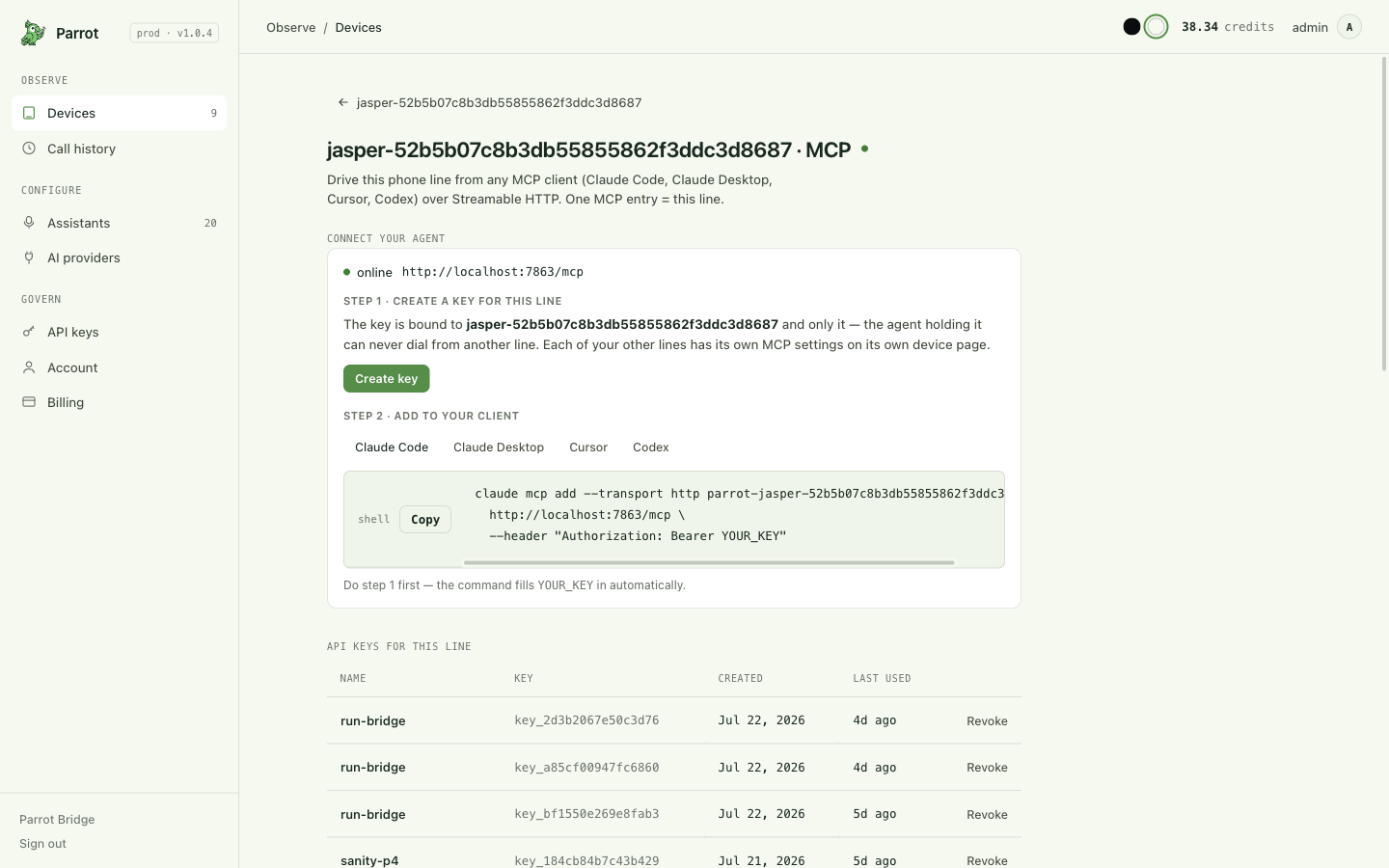
- Create a key for this line. The page mints an API key bound to this one device. The secret is shown once and dropped straight into the snippets below — copy things from there.
- Paste the snippet for your client. The page has a tab per client, already carrying your key and named after your line. Copy from there — the snippets below are the same thing with the values blanked out, so you can see what you're pasting.
That's it. Ask your agent to "call the pharmacy and ask if my prescription is ready" and watch History fill in.
The snippet, client by client
Parrot speaks MCP over plain Streamable HTTP, so every one of these is the
same two facts — the address and Authorization: Bearer <your key> — in
that app's own spelling. Nothing else is needed, and nothing else is different.
claude mcp add --transport http <your-line-name> \
  <your parrot host>/mcp \
  --header "Authorization: Bearer <your key>"
Check it with claude mcp list — your line must show as connected.
~/.codex/config.toml:
[mcp_servers.<your-line-name>]
url = "<your parrot host>/mcp"
http_headers = { Authorization = "Bearer <your key>" }
To keep the secret out of the file, use
bearer_token_env_var = "PARROT_API_KEY" instead of http_headers and put
the key in that environment variable. Codex dials HTTP itself — it needs no
bridge and no Node.js.
.cursor/mcp.json (or ~/.cursor/mcp.json for every project):
{
  "mcpServers": {
    "<your-line-name>": {
      "url": "<your parrot host>/mcp",
      "headers": { "Authorization": "Bearer <your key>" }
    }
  }
}
Windsurf uses this same shape.
.vscode/mcp.json:
{
  "servers": {
    "<your-line-name>": {
      "type": "http",
      "url": "<your parrot host>/mcp",
      "headers": { "Authorization": "Bearer <your key>" }
    }
  }
}
The top-level key is servers, not mcpServers — VS Code quietly
ignores the Cursor/Claude spelling, and you get no error, just no tools.
From a terminal you can also run
code --add-mcp '{"name":"…","type":"http","url":"…","headers":{…}}'.
~/.gemini/settings.json:
{
  "mcpServers": {
    "<your-line-name>": {
      "type": "http",
      "url": "<your parrot host>/mcp",
      "headers": { "Authorization": "Bearer <your key>" }
    }
  }
}
Keep "type": "http". On older Gemini CLI a bare url meant a
different (SSE) transport and the HTTP endpoint was spelled httpUrl, so a
snippet copied from another client connects to nothing. Or let the CLI write
it: gemini mcp add --transport http <name> <url> -H "Authorization: Bearer <your key>",
then gemini mcp list must say Connected.
settings.json:
{
  "context_servers": {
    "<your-line-name>": {
      "url": "<your parrot host>/mcp",
      "headers": { "Authorization": "Bearer <your key>" }
    }
  }
}
Zed's top-level key is context_servers. Leave the headers in — without
them Zed tries to sign you in instead, which Parrot doesn't offer yet.
claude_desktop_config.json:
{
  "mcpServers": {
    "<your-line-name>": {
      "command": "npx",
      "args": ["-y", "mcp-remote", "<your parrot host>/mcp",
               "--header", "Authorization: Bearer <your key>"]
    }
  }
}
This is the one client that needs a bridge. Claude Desktop's config file
only accepts servers it launches on your own machine, so mcp-remote stands
in the middle and forwards to the real address — which means it needs
Node.js installed. Restart Claude Desktop after saving.
Every other client above should get the URL directly; if a guide tells you
to wrap Parrot in npx mcp-remote for one of them, it's out of date.
If your client lets you set a URL and a header, it works — copy the Cursor tab and rename the fields to match. Writing your own agent? Pass the header to whatever streamable-HTTP MCP client your framework uses:
from mcp.client.streamable_http import streamablehttp_client

streamablehttp_client(
    "<your parrot host>/mcp",
    headers={"Authorization": "Bearer <your key>"},
)
The address works with or without a trailing slash, and the
assistant-authoring surface is the same address with /authoring on the end.
One-click “connectors” can’t take a key — yet
ChatGPT's custom connectors and Claude's Connectors panel add a server by signing you in to it, and give you nowhere to paste a key. Parrot doesn't offer that sign-in flow yet, so it cannot be added from those panels at all — this isn't something you can fix by pasting the key somewhere else. Use the config-file route above instead: for Claude, that's Claude Code or Claude Desktop's config file, not the Connectors tab.
Which URL is <your parrot host>?
The hosted console's MCP page fills this in for you — use its snippet
verbatim. Self-hosting? The MCP control plane is its own process: in a
local dev stack it listens on its own port (http://localhost:7863/mcp
on the classic band), while a production deployment routes /mcp on the
main host to it — and the server must know its public URL
(JASPER_PUBLIC_ORIGIN), or it answers public MCP requests with 421
Misdirected Request. The assistant-authoring surface is the same host
with /mcp/authoring appended.
Running a Claude-style agent? Install the skill instead of prose
skills/parrot-phone/SKILL.md in the repo is a condensed operating
manual written FOR agents — the outbound/inbound tool loops, the
request_info flow, error codes and retry semantics. Point your agent
runtime's skills directory at it and skip pasting docs into context.
Check it's connected — without burning a real call
Three checks, cheapest first, before you ask the agent to dial anything:
- The client sees the server. In Claude Code,
claude mcp listshould show your line's entry as connected. Any client: the tool list should includeplace_call,get_device_status,get_call_events. A connected entry already proves the key is good — Parrot checks the key while the client connects and refuses the connection if it isn't valid, so there is no such thing as "connected but the key is wrong". A client that shows an authentication error here is telling you the truth; see Troubleshooting for which of401/403/503it is. - The key reaches YOUR line. Ask the agent to run
get_device_status()— it costs nothing and dials nothing. A healthy, ready line answers withonline: true,bt_connected: true,call_state: "idle". If the board is powered but the phone wandered off, you'll seebt_connected: false— the key and server are fine, the Bluetooth side isn't. - (Only if you added
/mcp/authoring.) Ask forget_assistant_options()— it lists providers/voices and proves the authoring surface is wired.
No other debugging is worth doing before these three pass.
One key = one phone line
A key gives an agent exactly the device it was created for — there's no tool to list or switch devices. Give an agent two lines by creating two keys and adding two MCP entries. This is deliberate: you always know precisely which phone line an agent can touch.
What your agent can do
The tools, grouped the way an agent uses them:
| Tool | What it does | |
|---|---|---|
| Check the line | get_device_status |
Is the line online, idle, ringing, or mid-call right now? |
| Start a call | place_call |
Dial a number with an objective ("book a table for 4 at 7pm") and a time cap. |
answer_call |
Pick up a ringing inbound call — optionally with a specific assistant chosen for who's calling. By default the line answers itself the moment it rings (hands-free pickup), so there is normally nothing left for an agent to answer; this tool matters only on a line whose hands-free pickup has been turned off, where the carrier's own ring window (~20 s to voicemail) is the deadline and an inbound-handling agent idles on the events feed. | |
| Supervise it | get_call_events |
The live feed: transcript lines, state changes, and questions the assistant asks you mid-call. It long-polls (~25 s per call) — loop it back-to-back, never sleep between polls. |
steer_call |
Whisper an instruction mid-call — the other party never hears it. | |
respond_to_request_info |
Answer the assistant when it needs a fact only you have ("what's the member number?") — within about a minute, or the call proceeds without it. | |
send_dtmf |
Press phone-menu keys ("press 2 for pharmacy") — the phone plays real touch-tones into the call over the Hands-Free Profile (HFP) (how DTMF works). | |
end_call / cancel_call |
Hang up. | |
| Read the result | get_call_result |
Once ended: outcome, who hung up, full transcript, AI summary. (Structured field extraction is a console feature — an agent that needs data out of the call reads the transcript itself.) |
get_call_status / list_calls |
A snapshot of one call / the recent-calls list. get_call_status also returns a resumable events cursor and any pending mid-call question — it's how an agent that restarted picks a live call back up without replaying everything. |
|
| Manage assistants | list_assistants / get_assistant / configure_device |
See the available assistants, inspect one, change which one the line uses by default. |
One-off assistants, inline — no saving required. place_call and
answer_call accept more than a phone number: objective / context /
caller_identity fill the task slots of the built-in recipe (guardrails
intact — this is the recommended way), voice and language tweak
just those knobs, assistant_id runs a saved assistant (with
assistant.template_params to fill its {{variables}} for this call), and
assistant={…} lays a full temporary definition (provider, model, voice,
opening line, temperature…) over the base for that one call only —
nothing is saved, nothing leaks to the next call. system_prompt replaces
the entire prompt if you truly want to start from zero. This is why most
agents never need the authoring surface at all.
Assistant authoring tools (create / update / delete / get_assistant_options)
live on a second endpoint, /mcp/authoring — the full walkthrough is
Authoring assistants over MCP. Add it only when you want
your agent writing SAVED assistants, not just using them.
Clients that support MCP elicitation get answers for free
When the voice agent asks a mid-call question (request_info),
get_call_events surfaces it as a native form on elicitation-capable
clients and posts the reply back automatically. On any other client the
agent answers explicitly with respond_to_request_info(call_id, query_id,
answer) — within about a minute, or the call proceeds without it.
When a dial is refused — what the agent sees
The same pre-dial guardrails the console applies fire over MCP, as structured errors the agent can route on instead of parsing prose:
| Error | Meaning | Sensible reaction |
|---|---|---|
device_offline |
The line's bridge isn't connected | Report it; a human needs to power the board / reopen the bridge |
bt_not_connected |
Board online, phone out of Bluetooth reach | Report it; retrying won't help until the phone is back |
device_busy |
A call is already running (the error names its call_id) |
Supervise that call or wait for call_ended |
insufficient_credits |
The account's balance can't fund the dial | Stop dialing; surface to the owner |
daily_call_limit |
The account hit its per-day call cap | Stop dialing; surface to the owner |
missing_template_params |
The chosen assistant has a {{variable}} with no value |
Pass it in assistant.template_params |
server_busy / server_draining |
Transient server condition | Brief backoff, then one retry |
dial_timeout |
The phone never started the call | One retry is reasonable |
max_duration_s is required on every place_call and is clamped to the
account's ceiling — an agent can never place an unbounded call. After the
call, get_call_result always returns a deterministic outcome +
retryable flag (the full taxonomy lives in the repo:
docs/call_end_taxonomy.md).
Key management in practice
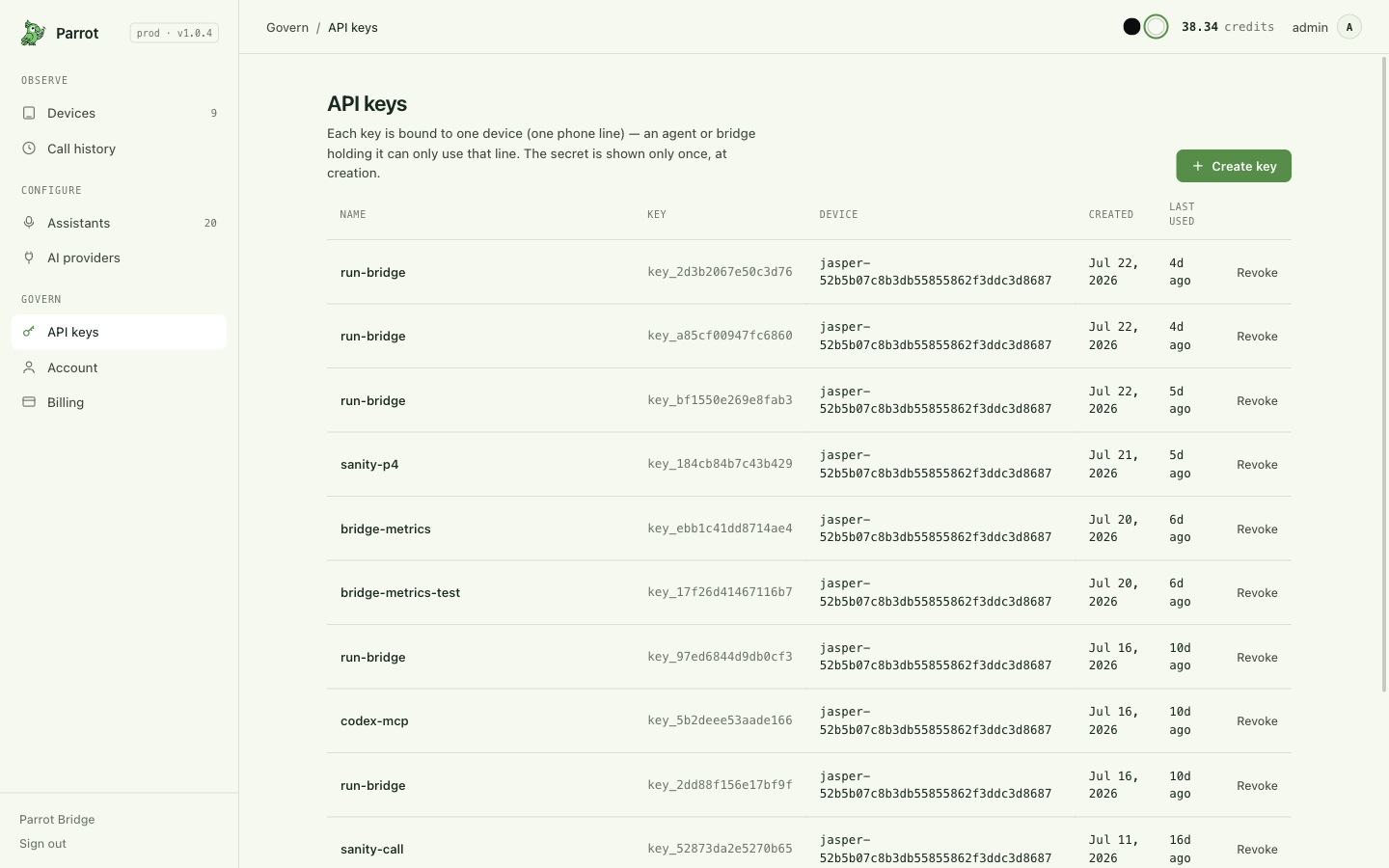
- One key = one line, forever. A key is minted FOR a device and can never touch another. Two lines for one agent = two keys = two MCP entries.
- Two places to mint: the device's MCP page (creates the key AND the client snippet in one step — the fast path) or API keys (the manager's view: every key, its device, when it was last used, revoke buttons).
- The secret shows once, at creation. There is no re-display; a lost secret means minting a new key.
- Revoking takes effect within about a minute. Anything the key tries to do — place a call, read a transcript — fails immediately; the connection itself drops on the next check, at most ~60 seconds later. This is the kill switch if a key leaks or an agent misbehaves; the phone line is untouched.
- Rotation is create-new → update the client config → revoke-old, in that order (zero downtime — both keys work during the overlap).
- Name keys after their agent ("claude-desktop", "ops-bot") — billing breaks usage down per key, so spend attribution comes free.
What a real errand looks like
A typical agent run, tool call by tool call:
get_device_status()→ the line isidle, clear to dial.place_call(to_number="+1…", max_duration_s=180, objective="Ask if they have a table for 4 tonight at 7; book under Chen if yes.")→ returns acall_id.- Loop
get_call_events(...)back-to-back — the transcript streams in. The restaurant offers 7:30 instead; the agent sendssteer_call("Accept 7:30 if 7:00 isn't available"). - The events feed shows the call ended →
get_call_result(call_id)→ outcomeanswered, summary: "Table for 4 booked at 7:30pm under Chen."
Inbound calls normally never reach an agent's decision at all: the line
answers itself the moment it rings (hands-free pickup, the default), and the
agent simply sees the call appear on the events feed. On a line whose
hands-free pickup has been turned off, the inbound direction mirrors the
outbound one: the agent idles on get_call_events, sees the line start
ringing — usually with a caller number attached, though some calls arrive
without one — decides whether and how to answer within the carrier's
~20-second ring window — maybe a different assistant for an unknown number
than for your mom — and calls answer_call.
Your agent can be mid-call support, not just a dialer
The request_info flow is the part people miss: if the assistant hits a
question it can't answer ("what insurance do you have?"), it asks your
agent, which can answer from its context — while the call keeps going.
Authoring assistants over MCP
For a one-off errand, place_call and answer_call accept an
inline assistant without saving it.
Reach for the authoring surface when you want your agent to build and keep a
reusable, named assistant — a recipe it (or you, or the console) can run
again by assistant_id, edit over time, and see in the console's Assistants
list. It lives on its own MCP endpoint precisely so its tool schemas don't weigh
on every calling session's context.
Connect it
Add a second MCP entry pointing at /mcp/authoring, with the same key as
your calling entry:
claude mcp add --transport http parrot-authoring \
  <your parrot host>/mcp/authoring \
  --header "Authorization: Bearer <your key>"
{
  "mcpServers": {
    "parrot-authoring": {
      "url": "<your parrot host>/mcp/authoring",
      "headers": { "Authorization": "Bearer <your key>" }
    }
  }
}
The key still binds one phone line — but assistants are account-scoped, so the ones you create here are usable on any line your account owns.
The four tools
| Tool | What it does |
|---|---|
get_assistant_options |
The valid building blocks: available protocols, providers, and their configuration defaults. Pass protocol (e.g. "ultravox") to also get that protocol's live model, voice, and language choices. Pass provider_id, model, and voice to describe the selection you are editing. Call this first so you build with real values instead of guesses. |
create_assistant |
Save a new reusable assistant under your account. Returns {assistant_id}. |
update_assistant |
Partial edit — only the fields you pass change. A content change appends a new immutable version; editing a factory template copies-on-write. Takes effect on the next call. |
delete_assistant |
Delete one of your assistants. Factory templates can't be deleted; deleting your copy of one reverts you to the template. |
The fields
create_assistant and update_assistant share one field set — create needs a
name, update needs an assistant_id and changes only what you pass:
| Field | Meaning |
|---|---|
name |
Display name in the Assistants list. |
objective |
The task in plain language. Provide either this or system_prompt. objective keeps every built-in guardrail (IVR handling, honesty, anti-loop, hang-up) and just fills the goal — prefer it. |
system_prompt |
The entire prompt, replacing all scaffolding. Full control, full responsibility: restate everything yourself. |
opening_line |
The first thing the agent says, when it speaks first. |
provider / model / voice |
The provider to use, model, and voice — validate against get_assistant_options. |
language |
Separate reply and input recognition preferences: {conversation: "zh-CN", recognition: "auto"}. Use IDs from get_assistant_options; auto removes that preference. |
first_speaker |
"agent" (it greets) or "user" (it waits). |
temperature |
Model creativity. |
template_params |
Default values for {{VARIABLES}} used in the prompt; a caller can still override them per call. TODAY and NOW are filled by the server (current local date/time) and are refused here. |
max_duration_s |
A default hard cap baked into this assistant. |
icon |
The icon shown beside it in the console. |
A typical authoring run
1. get_assistant_options(protocol="ultravox")
     → the providers, models and voices you can actually use

2. create_assistant(
       name="Dentist reminder",
       objective="Call the patient, confirm tomorrow's 3pm cleaning, and offer
                  to reschedule if they can't make it.",
       provider="ultravox", voice="…", first_speaker="agent")
     → { assistant_id: "asst_…" }

3. later, on the CALLING surface:
   place_call(to_number="+1…", max_duration_s=180, assistant_id="asst_…")
Edits are versioned and non-destructive: update_assistant(assistant_id, voice="…")
appends a new version that the next call picks up. A call already running
keeps the version it started with — the same freeze-at-call-start rule the
console applies when you edit an assistant mid-call.
Inline or saved — which one
Running a recipe once (a specific errand)? Pass it inline to
place_call — there's nothing to clean up afterwards. Running it again
(a routine your agent repeats, or one you want visible and editable in the
console)? Save it here and call it by assistant_id.
Troubleshooting
The client won't connect: 401 Unauthorized
The key is wrong, revoked, or truncated in the client config — the header is missing entirely if you see "no API key on this MCP connection". Keys are shown once at creation, so if in doubt mint a fresh one on the device's MCP page, replace it in the client snippet, and revoke the old one on API keys. Revoking takes effect within about a minute.
The client won't connect: 403 Forbidden
The key is real but isn't tied to exactly one phone line — either it has no device binding, or it's an all-devices admin key. An agent must never be able to pick which phone it dials from, so Parrot refuses those here. Mint a key from the device's own MCP page (that page always binds it to that line) and use it instead.
The client won't connect: 503
That one isn't you. The MCP control plane couldn't reach Parrot's main server; your key is fine. Retry shortly — and if it persists, it's an outage worth reporting.
get_device_status works but place_call is refused
The refusal names its reason — see the error table above. All of these are exactly the checks a console dial runs — fix the underlying one and the agent's dial goes through.
The agent says a tool like list_devices doesn't exist
It doesn't — a key IS the device selection (one key, one line). Point the
agent at the current tool set in
What your agent can do, or install the repo's
skills/parrot-phone skill, which describes the real API.
Where this fits
Everything the agent does lands in the same History as your own calls, runs the same assistants, and shows on the same device pages — MCP is a third hand on the same phone, not a separate system.